关于仓库的 GitHub Actions 权限
By default, GitHub Actions is enabled on all repositories and organizations. 您可以选择禁用 GitHub Actions 或将其限制为私有操作,这意味着人们只能使用仓库中存在的操作。 有关 GitHub Actions 的更多信息,请参阅“关于 GitHub Actions”。
您可以对您的仓库启用 GitHub Actions。 当您启用 GitHub Actions 时,工作流程能够运行位于您的仓库和任何其他公共仓库中的操作。 您可以对您的仓库完全禁用 GitHub Actions。 禁用 GitHub Actions 时,仓库中不会运行任何工作流程。
此外,您可以在您的仓库中启用 GitHub Actions,但限制工作流程可以运行的操作。 当您仅启用本地操作时,工作流程只能运行位于您的仓库或组织中的操作。
管理仓库的 GitHub Actions 权限
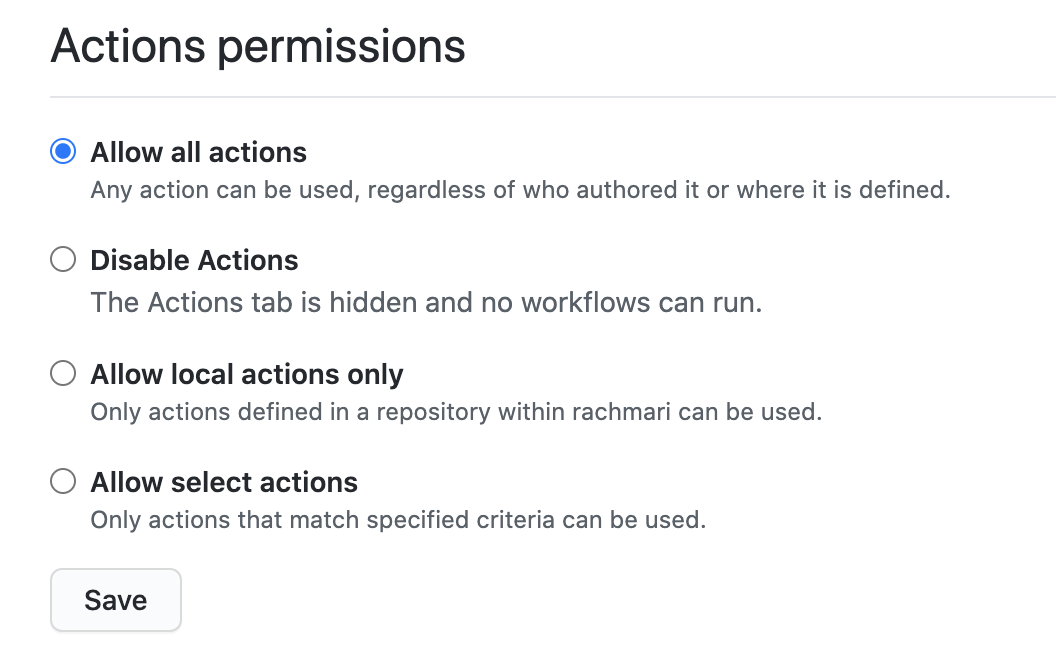
You can disable all workflows for a repository or set a policy that configures which actions can be used in a repository.
If you choose the option to Allow specific actions, there are additional options that you can configure. For more information, see "Allowing specific actions to run."
When you allow local actions only, the policy blocks all access to actions authored by GitHub. For example, the actions/checkout would not be accessible.
注:如果您的组织有覆盖策略或由具有覆盖策略的企业帐户管理,则可能无法管理这些设置。 For more information, see "Disabling or limiting GitHub Actions for your organization" or "Enforcing GitHub Actions policies in your enterprise account."
- 在 GitHub 上,导航到仓库的主页面。
- 在仓库名称下,单击 Settings(设置)。

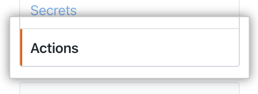
- 在左侧边栏中,单击 Actions(操作)。
- Under Actions permissions, select an option.
- 单击 Save(保存)。
Allowing specific actions to run
When you select the Allow select actions, there are additional options that you need to choose to configure the allowed actions:
-
Allow actions created by GitHub: You can allow all actions created by GitHub to be used by workflows. Actions created by GitHub are located in the
actionsandgithuborganization. For more information, see theactionsandgithuborganizations. -
Allow Marketplace actions by verified creators: You can allow all GitHub Marketplace actions created by verified creators to be used by workflows. When GitHub has verified the creator of the action as a partner organization, the badge is displayed next to the action in GitHub Marketplace.
-
Allow specified actions: You can restrict workflows to use actions in specific organizations and repositories.
To restrict access to specific tags or commit SHAs of an action, use the same
<OWNER>/<REPO>@<TAG OR SHA>syntax used in the workflow to select the action. For example,actions/javascript-action@v1.0.1to select a tag oractions/javascript-action@172239021f7ba04fe7327647b213799853a9eb89to select a SHA. For more information, see "Finding and customizing actions."You can use the
*wildcard character to match patterns. For example, to allow all actions in organizations that start withspace-org, you can specifyspace-org*/*. To add all actions in repositories that start with octocat, you can use*/octocat*@*. For more information about using the*wildcard, see "Workflow syntax for GitHub Actions."Note: The Allow specified actions option is only available in public repositories with the GitHub Free, GitHub Pro, GitHub Free for organizations, or GitHub Team plan.
This procedure demonstrates how to add specific actions to the allow list.
- 在 GitHub 上,导航到仓库的主页面。
- 在仓库名称下,单击 Settings(设置)。
- 在左侧边栏中,单击 Actions(操作)。
- Under Actions permissions, select Allow specific actions and add your required actions to the list.

- 单击 Save(保存)。
为私有仓库复刻启用工作流程
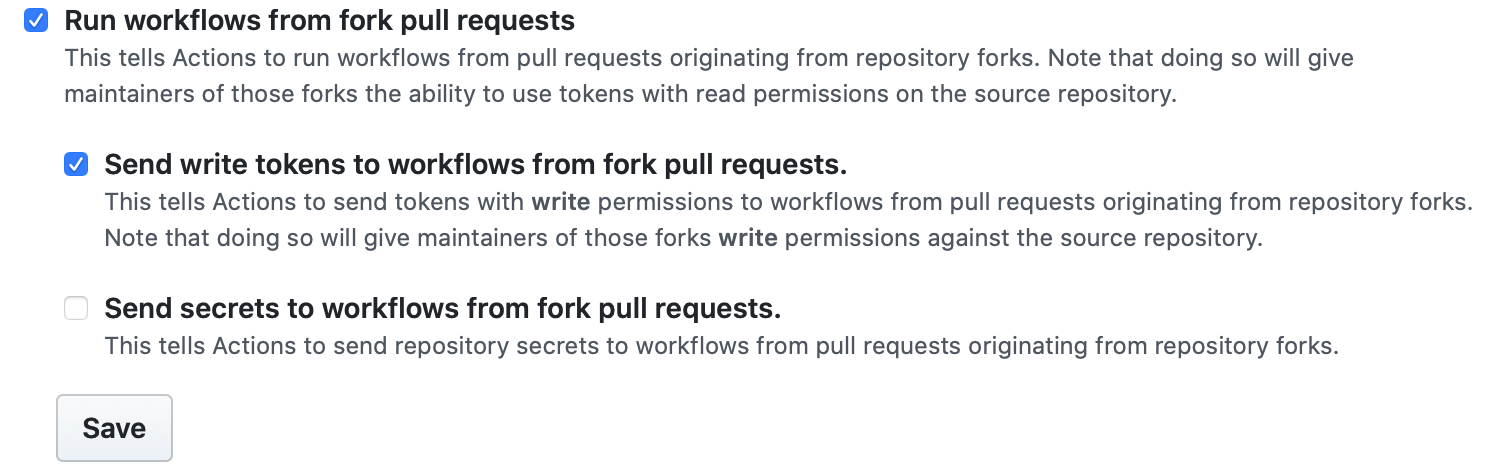
如果您依赖于使用私有仓库的复刻,您可以配置策略来控制用户如何在 pull_request 事件上运行工作流程。 (仅适用于私有仓库)您可以为企业、组织或仓库配置这些策略设置。 对于企业,该策略将应用到所有组织中的所有仓库。
- Run workflows from fork pull requests(从复刻拉取请求运行工作流程) - 允许用户使用具有只读权限、没有密码访问权限的
GITHUB_TOKEN从复刻拉取请求运行工作流程。 - Send write tokens to workflows from pull requests(从拉取请求向工作流程发送写入令牌) - 允许从复刻拉取请求以使用具有写入权限的
GITHUB_TOKEN。 - Send secrets to workflows from pull requests(从拉取请求向工作流程发送密码) - 使所有密码可用于拉取请求。
为仓库配置私有复刻策略
- 在 GitHub 上,导航到仓库的主页面。
- 在仓库名称下,单击 Settings(设置)。
- 在左侧边栏中,单击 Actions(操作)。
- 在 Fork pull request workflows(复刻拉取请求工作流程)下,选择您的选项。 例如:
- 单击 Save(保存)以应用设置。