GitHub Actions の支払いを管理する GitHubは、macOSランナーのホストにMacStadiumを使用しています。
リポジトリの GitHub Actions 権限について
By default, GitHub Actions is enabled on all repositories and organizations. You can choose to disable GitHub Actions or limit them to private actions only, which means that people can only use actions that exist in your repository. GitHub Actions の詳細は、「GitHub Actionsについて」を参照してください。
リポジトリで GitHub Actions を有効化できます。 GitHub Actionsを有効化すると、ワークフローはリポジトリ内と、その他の任意のパブリックリポジトリ内のアクションを実行できるようになります。 リポジトリの GitHub Actions を完全に無効化することができます。 GitHub Actionsを無効化すると、リポジトリでワークフローが実行されなくなります。
または、リポジトリで GitHub Actions を有効化して、ワークフローで実行できるアクションを制限することもできます。 ローカルアクションのみを有効化した場合、ワークフローはリポジトリあるいはOrganization内のアクションだけを実行できるようになります。
リポジトリの GitHub Actions 権限を管理する
You can disable all workflows for a repository or set a policy that configures which actions can be used in a repository.
If you choose the option to Allow specific actions, there are additional options that you can configure. For more information, see "Allowing specific actions to run."
When you allow local actions only, the policy blocks all access to actions authored by GitHub. For example, the actions/checkout would not be accessible.
注釈: Organization に優先ポリシーがあるか、優先ポリシーのある Enterprise アカウントによって管理されている場合、これらの設定を管理できない場合があります。 For more information, see "Disabling or limiting GitHub Actions for your organization" or "Enforcing GitHub Actions policies in your enterprise account."
- GitHubで、リポジトリのメインページにアクセスしてください。
- リポジトリ名の下で Settings(設定)をクリックしてください。

- サイドバーでActions(アクション)をクリックしてください。
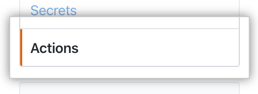
- Under Actions permissions, select an option.

- [Save] をクリックします。
Allowing specific actions to run
When you select the Allow select actions, there are additional options that you need to choose to configure the allowed actions:
-
Allow actions created by GitHub: You can allow all actions created by GitHub to be used by workflows. Actions created by GitHub are located in the
actionsandgithuborganization. For more information, see theactionsandgithuborganizations. -
Allow Marketplace actions by verified creators: You can allow all GitHub Marketplace actions created by verified creators to be used by workflows. When GitHub has verified the creator of the action as a partner organization, the badge is displayed next to the action in GitHub Marketplace.
-
Allow specified actions: You can restrict workflows to use actions in specific organizations and repositories.
To restrict access to specific tags or commit SHAs of an action, use the same
<OWNER>/<REPO>@<TAG OR SHA>syntax used in the workflow to select the action. For example,actions/javascript-action@v1.0.1to select a tag oractions/javascript-action@172239021f7ba04fe7327647b213799853a9eb89to select a SHA. For more information, see "Finding and customizing actions."You can use the
*wildcard character to match patterns. For example, to allow all actions in organizations that start withspace-org, you can specifyspace-org*/*. To add all actions in repositories that start with octocat, you can use*/octocat*@*. For more information about using the*wildcard, see "Workflow syntax for GitHub Actions."Note: The Allow specified actions option is only available in public repositories with the GitHub Free, GitHub Pro, GitHub Free for organizations, or GitHub Team plan.
This procedure demonstrates how to add specific actions to the allow list.
- GitHubで、リポジトリのメインページにアクセスしてください。
- リポジトリ名の下で Settings(設定)をクリックしてください。
- サイドバーでActions(アクション)をクリックしてください。
- Under Actions permissions, select Allow specific actions and add your required actions to the list.

- [Save] をクリックします。
プライベートリポジトリのフォークのワークフローを有効にする
If you rely on using forks of your private repositories, you can configure policies that control how users can run workflows on pull_request events. Available to private repositories only, you can configure these policy settings for enterprise accounts, organizations, or repositories. For enterprise accounts, the policies are applied to all repositories in all organizations.
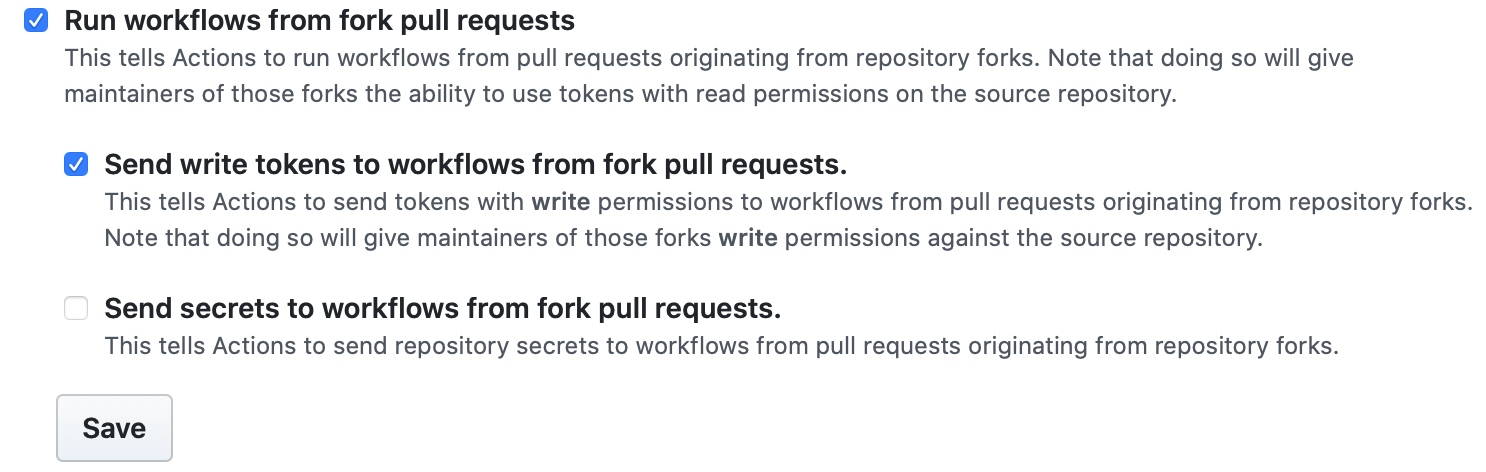
- Run workflows from fork pull requests - Allows users to run workflows from fork pull requests, using a
GITHUB_TOKENwith read-only permission, and with no access to secrets. - Send write tokens to workflows from pull requests - Allows pull requests from forks to use a
GITHUB_TOKENwith write permission. - Send secrets to workflows from pull requests - Makes all secrets available to the pull request.
リポジトリのプライベートフォークポリシーを設定する
- GitHubで、リポジトリのメインページにアクセスしてください。
- リポジトリ名の下で Settings(設定)をクリックしてください。
- サイドバーでActions(アクション)をクリックしてください。
- Under Fork pull request workflows, select your options. 例:
- Click Save to apply the settings.