Personal access tokens (PATs) are an alternative to using passwords for authentication to GitHub Enterprise when using the GitHub API or the command line.
Creating a token
-
En la esquina superior derecha de cualquier página, da clic en tu foto de perfil y después da clic en Configuración.

-
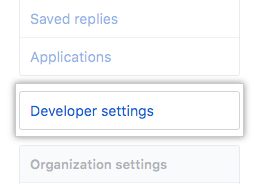
En la barra lateral izquierda, haz clic en Developer settings (Parámetros del desarrollador).
-
En la barra lateral izquierda, da clic en Tokens de acceso personal.

-
Click Generate new token.

-
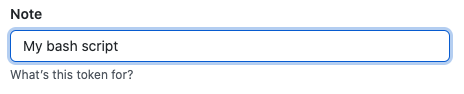
Give your token a descriptive name.
-
Select the scopes, or permissions, you'd like to grant this token. To use your token to access repositories from the command line, select repo.

-
Click Generate token.

-
Click to copy the token to your clipboard. For security reasons, after you navigate off the page, you will not be able to see the token again.

Warning: Treat your tokens like passwords and keep them secret. When working with the API, use tokens as environment variables instead of hardcoding them into your programs.
Using a token on the command line
Una vez que tengas un token, puedes ingresarlo en lugar de tu contraseña cuando realices operaciones de Git a través de HTTPS.
Por ejemplo, en la línea de comando ingresarás lo siguiente:
$ git clone https://nombre de host/username/repo.git
Username: your_username
Password: your_token
Personal access tokens can only be used for HTTPS Git operations. If your repository uses an SSH remote URL, you will need to switch the remote from SSH to HTTPS.
If you are not prompted for your username and password, your credentials may be cached on your computer. You can update your credentials in the Keychain to replace your old password with the token.