Managing secret scanning alerts
-
GitHubで、リポジトリのメインページにアクセスしてください。
-
リポジトリ名の下で Security(セキュリティ)をクリックしてください。

-
左サイトバーで、[Secret scanning alerts] をクリックします。
![[Secret scanning alert] タブ](/web/20210702050328im_/https://docs.github.com/assets/images/help/repository/sidebar-secrets.png)
-
[Secret scanning] の下で、表示するアラートをクリックします。
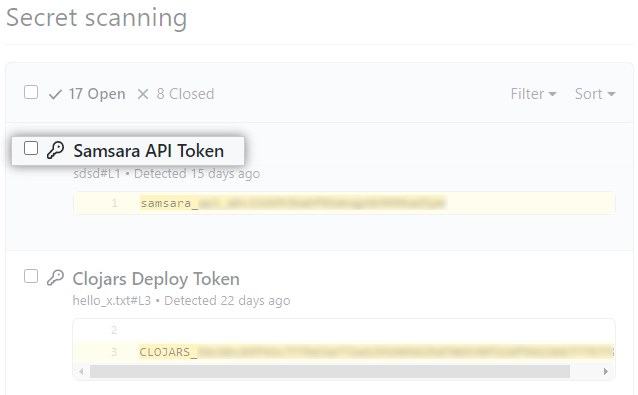
-
必要に応じて、[Mark as] ドロップダウンメニューを使用して、アラートを解決する理由をクリックします。
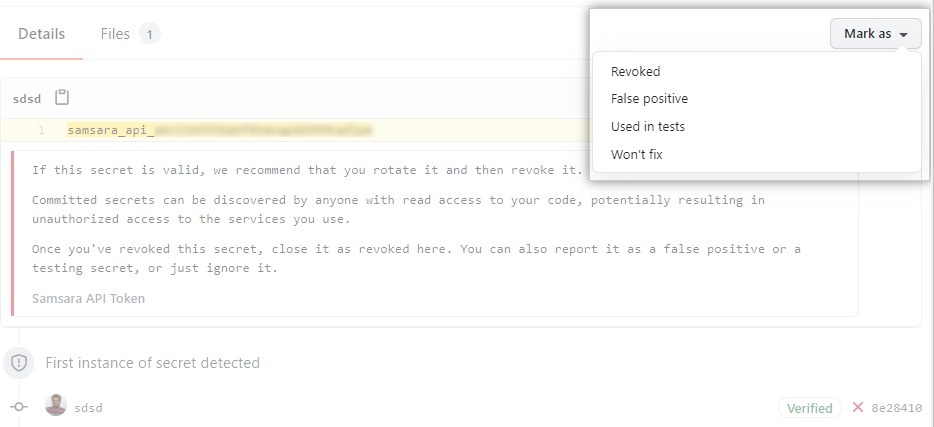
侵害されたシークレットを保護する
シークレットがリポジトリにコミットされたら、シークレットが侵害されたと考える必要があります。 GitHub は、侵害されたシークレットに対して次のアクションを行うことをおすすめします。
- 侵害された GitHub の個人アクセストークンについては、侵害されたトークンを削除し、新しいトークンを作成し、古いトークンを使っていたサービスを更新してください。 詳しい情報についてはコマンドラインのための個人のアクセストークンの作成を参照してください。
- それ以外のすべてのシークレットについては、最初に GitHub にコミットされたシークレットが有効であることを確認してください。 有効である場合は、新しいシークレットを作成し、古いシークレットを使用するサービスを更新してから、古いシークレットを削除します。
Configuring notifications for secret scanning alerts
When a new secret is detected, GitHub notifies all users with access to security alerts for the repository according to their notification preferences. You will receive alerts if you are watching the repository, have enabled notifications for security alerts, or are the author of the commit that contains the secret and are not ignoring the repository.
For more information, see "Managing security and analysis settings for your repository" and "Configuring notifications."