About forks
Most commonly, forks are used to either propose changes to someone else's project or to use someone else's project as a starting point for your own idea. You can fork a repository to create a copy of the repository and make changes without affecting the upstream repository. For more information, see "Working with forks."
Propose changes to someone else's project
For example, you can use forks to propose changes related to fixing a bug. Rather than logging an issue for a bug you've found, you can:
- Fork the repository.
- Make the fix.
- Submit a pull request to the project owner.
Use someone else's project as a starting point for your own idea.
Open source software is based on the idea that by sharing code, we can make better, more reliable software. For more information, see the "About the Open Source Initiative" on the Open Source Initiative.
For more information about applying open source principles to your organization's development work on your enterprise, see GitHub's white paper "An introduction to innersource."
Prerequisites
If you haven't yet, you should first set up Git. Don't forget to set up authentication to your enterprise from Git as well.
Forking a repository
You might fork a project to propose changes to the upstream, or original, repository. In this case, it's good practice to regularly sync your fork with the upstream repository. To do this, you'll need to use Git on the command line. You can practice setting the upstream repository using the same octocat/Spoon-Knife repository you just forked.
- On your enterprise, navigate to the octocat/Spoon-Knife repository.
- In the top-right corner of the page, click Fork.

Para saber mais sobre GitHub CLI, consulte "Sobre GitHub CLI."
To create a fork of a repository, use the gh repo fork subcommand.
gh repo fork repositoryTo create the fork in an organization, use the --org flag.
gh repo fork repository --org "octo-org"Cloning your forked repository
Right now, you have a fork of the Spoon-Knife repository, but you don't have the files in that repository locally on your computer.
-
On your enterprise, navigate to your fork of the Spoon-Knife repository.
-
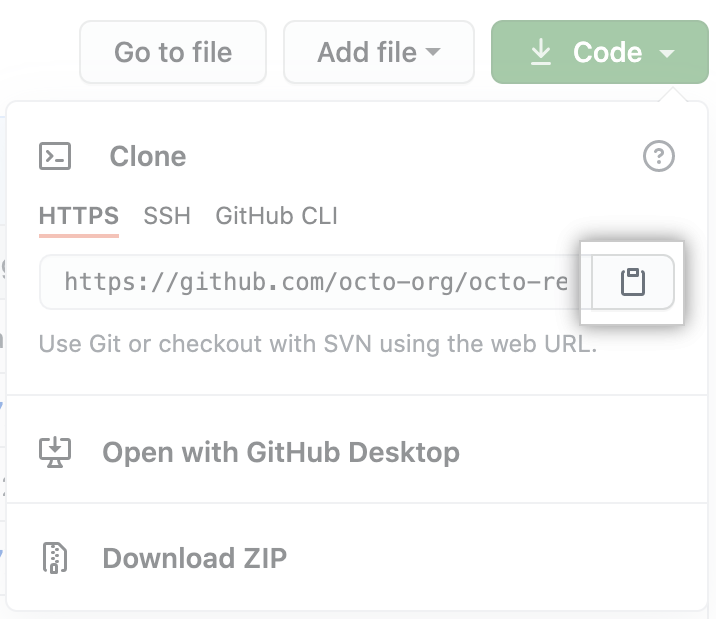
Acima da lista de arquivos, clique em código.

-
Para clonar o repositório usando HTTPS, em "Clonar com HTTPS", clique em . To clone the repository using an SSH key, including a certificate issued by your organization's SSH certificate authority, click Use SSH, then click . To clone a repository using GitHub CLI, click Use GitHub CLI, then click .

-
Abra TerminalTerminalGit Bash.
-
Altere o diretório de trabalho atual para o local em que deseja ter o diretório clonado.
-
Type
git clone, and then paste the URL you copied earlier. It will look like this, with your GitHub AE username instead ofYOUR-USERNAME:$ git clone https://hostname/YOUR-USERNAME/Spoon-Knife -
Press Enter. Your local clone will be created.
$ git clone https://hostname/YOUR-USERNAME/Spoon-Knife
> Cloning into `Spoon-Knife`...
> remote: Counting objects: 10, done.
> remote: Compressing objects: 100% (8/8), done.
> remove: Total 10 (delta 1), reused 10 (delta 1)
> Unpacking objects: 100% (10/10), done.
Para saber mais sobre GitHub CLI, consulte "Sobre GitHub CLI."
To create a clone of your fork, use the --clone flag.
gh repo fork repository --clone=true-
No menu File (Arquivo), clique em Clone Repository (Clonar repositório).


-
Clique na aba que corresponde à localização do repositório que você deseja clonar. Você também pode clicar URL para inserir manualmente o local do repositório.


-
Escolha o repositório que você quer clonar na lista.


-
Clique em Escolher... e acesse um caminho local onde você deseja clonar o repositório.


-
Clique em Clone (Clonar).


Configuring Git to sync your fork with the original repository
When you fork a project in order to propose changes to the original repository, you can configure Git to pull changes from the original, or upstream, repository into the local clone of your fork.
-
On your enterprise, navigate to the octocat/Spoon-Knife repository.
-
Acima da lista de arquivos, clique em código.
-
Para clonar o repositório usando HTTPS, em "Clonar com HTTPS", clique em . To clone the repository using an SSH key, including a certificate issued by your organization's SSH certificate authority, click Use SSH, then click . To clone a repository using GitHub CLI, click Use GitHub CLI, then click .
-
Abra TerminalTerminalGit Bash.
-
Change directories to the location of the fork you cloned.
- To go to your home directory, type just
cdwith no other text. - To list the files and folders in your current directory, type
ls. - To go into one of your listed directories, type
cd your_listed_directory. - To go up one directory, type
cd ...
- To go to your home directory, type just
-
Type
git remote -vand press Enter. You'll see the current configured remote repository for your fork.$ git remote -v > origin https://hostname/YOUR_USERNAME/YOUR_FORK.git (fetch) > origin https://hostname/YOUR_USERNAME/YOUR_FORK.git (push) -
Type
git remote add upstream, and then paste the URL you copied in Step 2 and press Enter. It will look like this:$ git remote add upstream https://hostname/octocat/Spoon-Knife.git -
To verify the new upstream repository you've specified for your fork, type
git remote -vagain. You should see the URL for your fork asorigin, and the URL for the original repository asupstream.$ git remote -v > origin https://hostname/YOUR_USERNAME/YOUR_FORK.git (fetch) > origin https://hostname/YOUR_USERNAME/YOUR_FORK.git (push) > upstream https://hostname/ORIGINAL_OWNER/ORIGINAL_REPOSITORY.git (fetch) > upstream https://hostname/ORIGINAL_OWNER/ORIGINAL_REPOSITORY.git (push)
Now, you can keep your fork synced with the upstream repository with a few Git commands. For more information, see "Syncing a fork."
Para saber mais sobre GitHub CLI, consulte "Sobre GitHub CLI."
To configure a remote repository for the forked repository, use the --remote flag.
gh repo fork repository --remote=trueTo specify the remote repository's name, use the --remote-name flag.
gh repo fork repository --remote-name "main-remote-repo"Next steps
You can make any changes to a fork, including:
- Creating branches: Branches allow you to build new features or test out ideas without putting your main project at risk.
- Opening pull requests: If you are hoping to contribute back to the original repository, you can send a request to the original author to pull your fork into their repository by submitting a pull request.
Find another repository to fork
Fork a repository to start contributing to a project. Se as políticas da empresa permitem a bifurcação de repositórios internos e privados, Você pode criar um fork de um repositório para a sua conta de usuário ou para qualquer organização onde você tenha permissões de criação de repositório. For more information, see "Roles in an organization."
Celebrate
You have now forked a repository, practiced cloning your fork, and configured an upstream repository. For more information about cloning the fork and syncing the changes in a forked repository from your computer see "Set up Git."
You can also create a new repository where you can put all your projects and share the code on GitHub. For more information see, "Create a repository."
Each repository in GitHub AE is owned by a person or an organization. You can interact with the people, repositories, and organizations by connecting and following them on GitHub AE. For more information see "Be social."
GitHub tem uma ótima comunidade de suporte onde você pode pedir ajuda e conversar com pessoas de todo o mundo. Junte-se à conversa na Comunidade de Suporte do Github.