Current features and upcoming roadmap for Microsoft Stream (on SharePoint)
Note
The earlier version of Stream will now be known as Microsoft Stream (Classic) and the new version will be referred to as Microsoft Stream (on SharePoint) to clarify the differences in this article.
In this article, you'll learn what you can expect from Stream (built on SharePoint) today and understand what's coming next on the roadmap.
What is available on Stream (on SharePoint) today?
Many capabilities are already available today if you upload videos to SharePoint, Teams, Yammer, or OneDrive.
Getting back to videos
Stream start page to find your videos & ones shared with you, SharePoint admins can change the Stream tile in the Microsoft 365 application launcher to go to this new experience.

Custom page, site, & portal experiences for videos to create destinations for SharePoint, Teams, and Viva to feature your videos

Feature videos in a Teams channel tab as a replacement for Stream (Classic) channel tab

Searching for videos and meeting recordings in Microsoft Search based on metadata and transcript of the video
Videos are discoverable in recommendations and feeds from Office.com, Microsoft 365 tab in Microsoft Edge, files section in profile cards, etc.

Video playback
Adaptive bitrate playback backed by CDN for any video file uploaded to SharePoint, OneDrive, Teams, or Yammer
Ability to share, copy link, download, delete, and see version history of your video
Multi-speed play back for Teams meeting recordings
Noise suppression option to focus just on a speaker's voice without background noise or music
Play back support in the mobile apps for Microsoft Teams, OneDrive, SharePoint, and Yammer
Workaround to get embed code that works if the user is already logged into Microsoft 365
Note
This method is just a workaround for now. We are working to build a "Get embed code" button into videos in SharePoint. The embed code will do the sign-in flow if the user isn't logged in yet.
Workaround to manually create a link to start playing a video at a specific time code
- Append this to end of a link to a video in SharePoint or OneDrive: &nav={"playbackOptions":{"startTimeInSeconds":60}}
- Replace 60 with the number of seconds into the video you want the video to start playing at
Note
This method is just a workaround for now. We're working to add a "Share at time code" button for videos in SharePoint.
Video enhancements
Manually add chapters to make it easier for viewers to jump to the part they're interested in

Automatically generated transcript / closed caption in English or manually uploaded WebVTT closed caption in any language (support for 18 languages rolling out now)
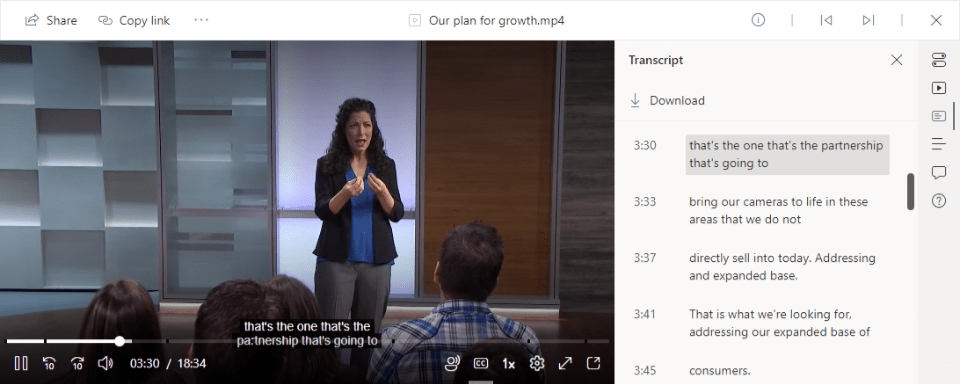
-
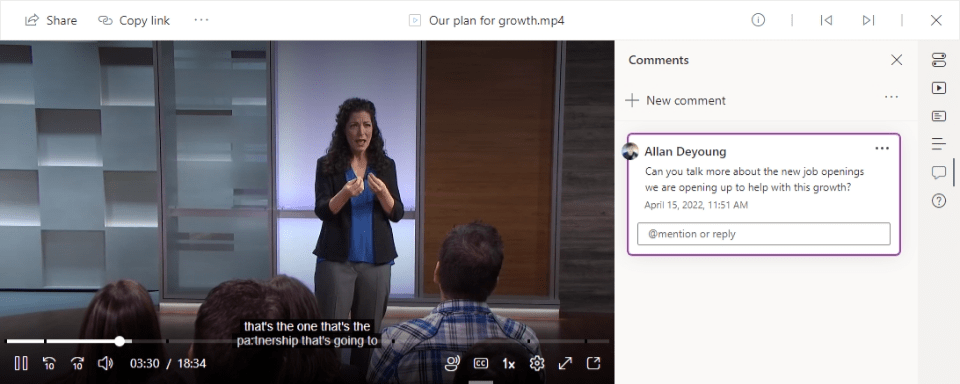
About video to set the title and rich text description including hyperlinks

Video settings to set a custom thumbnail (custom image or pick a frame from video) and enable or disable specific attributes of the video

Sharing
Advanced sharing options for your video, standard to any other file on Microsoft 365

Guest support for videos
Unauthenticated external video sharing from OneDrive and SharePoint “anyone” links

Analytics, security, and compliance
Video analytics: from the file in the library > ... > Details > select the view count to open file statistics charts
Site usage data, showing overall traffic, popular content, and usage insights: Site gear > Site contents > Site usage

Video availability in more regional data centers
Multi-Geo support for video storage
Service encryption with Microsoft Purview Customer Key support for videos
Basic information governance for videos (eDiscovery, legal hold, retention, & DLP policies)
Power Apps and Power Automate for videos
APIs based on the Microsoft Graph Files API for basic video operations
Video in Viva Connections
Feature videos on your intranet home page with video web parts
Detailed feature comparison to Stream (Classic)
Last updated: August 23, 2022
For a more detailed feature comparison of Stream (Classic) to Stream (on SharePoint), download this spreadsheet: Feature comparison & migration info for Stream (Classic) and Stream (on SharePoint)
Video and audio player will keep getting better
As we add new video capabilities they'll show up directly in the current SharePoint, OneDrive, Teams, and Yammer video player. In addition, we're rolling out the new Stream web application player page that will be used whenever someone shares a link to a video, finds it in search, or selects it from the Stream start page, office.com, or a SharePoint web part. The new Stream web app looks much more like Stream (Classic) with the title and description directly below the video and the transcript, chapters, or comments showing by default.
Current player page
New Stream web application player page (rolling out now)

Under-development features with dates
See the Microsoft 365 roadmap with product filtered to "Microsoft Stream": https://aka.ms/StreamRoadmapDates
Recently released features
See the Microsoft 365 roadmap with product filtered to "Microsoft Stream" & status set to "Launched": https://aka.ms/StreamRoadmapLaunched
Help inform the roadmap
To help inform the roadmap:
Add your ideas and vote for features on our Stream ideas forum: https://aka.ms/StreamIdeas/
Connect with us directly by enrolling in our customer connection program: https://aka.ms/StreamConnect
Talk with us and other customers in the Tech Community forums: https://aka.ms/StreamForum