question

OmarDavis-7537 avatar image
0 Votes"
OmarDavis-7537 asked RebeccaR-0418 answered

JSON returning Null

I'm trying to use Logic Apps to create an automation around Azure AD managed devices. I have two Graph API calls which are executed via a HTTP requests that return the desired results. I then parses these objects as a JSON file using the schema shown below. However, whenever I try to manipulate the JSON objects I get the following error:

ExpressionEvaluationFailed. The execution of template action 'For_each' failed: the result of the evaluation of 'foreach' expression '@body('Parse_JSON_-_Managed_Devices')?['body']?['value']' is of type 'Null'. The result must be a valid array.


JSON to get all managed devices
Graph query: https://graph.microsoft.com/beta/deviceManagement/managedDevices/?$select=id,userId,deviceName,userDisplayName,azureADDeviceId,managedDeviceName,emailAddress&$filter=operatingSystem eq 'windows'

 {
     "properties": {
         "body": {
             "properties": {
                 "@@odata.context": {
                     "type": "string"
                 },
                 "@@odata.count": {
                     "type": "integer"
                 },
                 "@@odata.nextLink": {
                     "type": "string"
                 },
                 "value": {
                     "items": {
                         "properties": {
                             "azureADDeviceId": {
                                 "type": "string"
                             },
                             "deviceName": {
                                 "type": "string"
                             },
                             "emailAddress": {
                                 "type": "string"
                             },
                             "id": {
                                 "type": "string"
                             },
                             "managedDeviceName": {
                                 "type": "string"
                             },
                             "userDisplayName": {
                                 "type": "string"
                             },
                             "userId": {
                                 "type": "string"
                             }
                         },
                         "required": [
                             "id",
                             "userId",
                             "deviceName",
                             "userDisplayName",
                             "azureADDeviceId",
                             "managedDeviceName",
                             "emailAddress"
                         ],
                         "type": "object"
                     },
                     "type": "array"
                 }
             },
             "type": "object"
         }
     },
     "type": "object"
 }


JSON to get all users
Graph query: https://graph.microsoft.com/beta/users?$select=id,displayName,mail,officeLocation&$filter=accountEnabled eq true

 {
     "properties": {
         "body": {
             "properties": {
                 "@@odata.context": {
                     "type": "string"
                 },
                 "@@odata.nextLink": {
                     "type": "string"
                 },
                 "value": {
                     "items": {
                         "properties": {
                             "displayName": {
                                 "type": "string"
                             },
                             "id": {
                                 "type": "string"
                             },
                             "mail": {
                                 "type": "string"
                             },
                             "officeLocation": {
                                 "type": "string"
                             }
                         },
                         "required": [
                             "id",
                             "displayName",
                             "mail",
                             "officeLocation"
                         ],
                         "type": "object"
                     },
                     "type": "array"
                 }
             },
             "type": "object"
         }
     },
     "type": "object"
 }


I would love if someone could help point me in the right direction.

Thanks in advance.

azure-logic-appsmem-intune-graph
· 1
5 |1600 characters needed characters left characters exceeded

Up to 10 attachments (including images) can be used with a maximum of 3.0 MiB each and 30.0 MiB total.

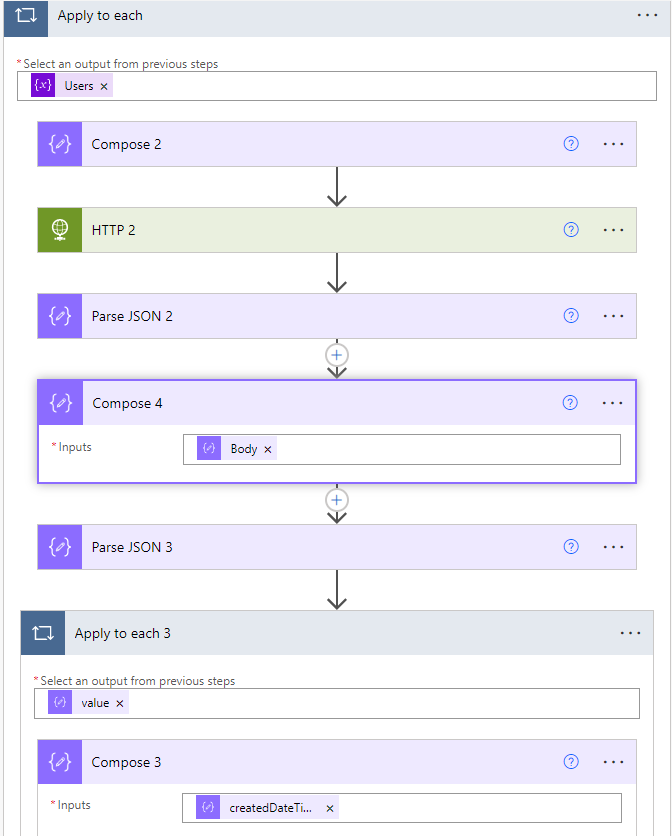
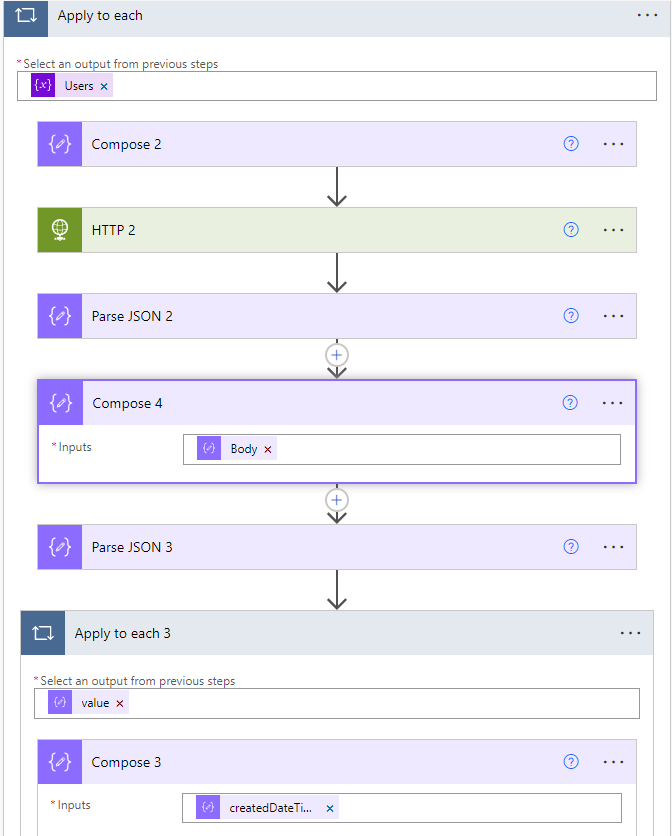
Ran into the same issue, solved it by parsing the result of the HTTP request, sticking the body of the parse JSON into a compose, and re-parsing that output.
209194-image.png


0 Votes 0 ·
image.png (33.0 KiB)
CiciWu2-MSFT avatar image
0 Votes"
CiciWu2-MSFT answered

I have done some research and tests but haven’t found any solution. For such kind of JSON coding issue, it is better to create a Premier support ticket to resolve this issue more effectively. Here is the link: https://docs.microsoft.com/en-us/mem/get-support#the-support-experience


5 |1600 characters needed characters left characters exceeded

Up to 10 attachments (including images) can be used with a maximum of 3.0 MiB each and 30.0 MiB total.

MayankBargali-MSFT avatar image
0 Votes"
MayankBargali-MSFT answered MayankBargali-MSFT commented

Hi @OmarDavis-7537

Welcome to Microsoft Q&A! Thanks for posting the question.

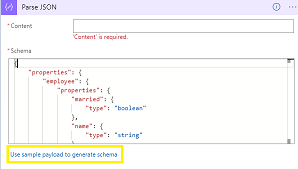
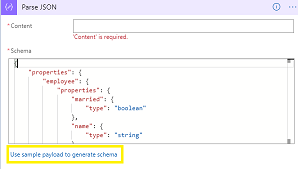
You can leverage the "Use sample payload to generate schema" option of the "Parse Json" action to generate the schema.
To get the sample JSON payload you can execute the API here: https://developer.microsoft.com/en-us/graph/graph-explorer selecting the beta version drop down as your API URL has a beta path.

94247-image.png

Regarding the error "ExpressionEvaluationFailed. The execution of template action 'For_each' failed: the result of the evaluation of 'foreach' expression '@body('Parse_JSON_-_Managed_Devices')?['body']?['value']' is of type 'Null'. The result must be a valid array." it means that the parson JSON action does not have the JSON value as the array values. If the data is returned correctly from the API but the schema is incorrect then the parsing will not happen correctly and the value for this action is NULL in your case. It's better to generate the schema using the sample input.

Hope the above helps. Feel free to get back to me if you need any assistance.


image.png (11.1 KiB)
· 2
5 |1600 characters needed characters left characters exceeded

Up to 10 attachments (including images) can be used with a maximum of 3.0 MiB each and 30.0 MiB total.

Hi @MayankBargali-MSFT and @CiciWu2-MSFT,

I did generate the schema using the sample data. I even tried to strip the sample data of nonessential info and still end up with the same results. I'll try again, but if that fails I'll @CiciWu2-MSFT's suggestion of opening a support case.

Thanks for the response btw.

0 Votes 0 ·

@OmarDavis-7537 Sure. I will also suggest you to navigate to your run history for the failed run's. Please check the JSON output for the HTTP call and use the output to generate the schema for your "Parse_JSON_Managed_Devices" action. Then run the test and verify whether your "Parse_JSON_Managed_Devices" action was successfully parsed the JSON object and it returns the array of objects.

0 Votes 0 ·
SusanneKuusansalo-3687 avatar image
0 Votes"
SusanneKuusansalo-3687 answered

Hi,
Any update on this case?

I'm facing the same problem, valid JSON with a generated schema from actual data. Yet any reference to the array within the JSON returns null

5 |1600 characters needed characters left characters exceeded

Up to 10 attachments (including images) can be used with a maximum of 3.0 MiB each and 30.0 MiB total.

RebeccaR-0418 avatar image
0 Votes"
RebeccaR-0418 answered

I had a similar issue, and the cause was the dynamic content syntax - when I used the dynamic content option for the property, I always got a NULL error result ("The execution of template action 'Apply_to_each_4' failed: the result of the evaluation of 'foreach' expression '@body('Parse_JSON')?['body']?['File']' is of type 'Null'. The result must be a valid array."). After playing around with the expression manually, I found that the dynamic content was putting an extra 'body' and '?'s between objects/arrays/properties and removing them gave me the expected result.

Didn't work (dynamic content expression): @body('Parse_JSON')?['body']?['File']
Did work: @body('Parse_JSON')['File']

Credit to smeadows for pointing me in the right direction from this Power Automate post: https://powerusers.microsoft.com/t5/General-Power-Automate/Parse-JSON-Null-Error-JSON-to-CSV/td-p/1251085

5 |1600 characters needed characters left characters exceeded

Up to 10 attachments (including images) can be used with a maximum of 3.0 MiB each and 30.0 MiB total.