By connecting a repository to a package, the package landing page will show information and links from the repository, such as the README.
Connecting a repository to a user-owned package on GitHub
-
On GitHub, navigate to the main page of your personal account.
-
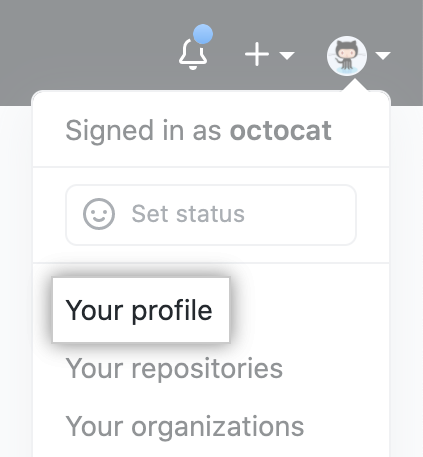
In the top right corner of GitHub.com, click your profile photo, then click Your profile.
-
On your profile page, in the top right, click Packages.

-
Under your package versions, click Connect repository.

-
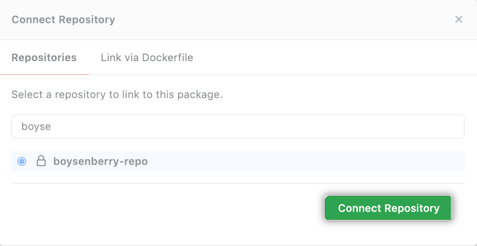
Select a repository, then click Connect repository.
Connecting a repository to an organization-owned package on GitHub
-
On GitHub, navigate to the main page of your organization.
-
Under your organization name, click Packages.

-
Under your package versions, click Connect repository.
-
Select a repository, then click Connect repository.
Connecting a repository to a container image using the command line
-
In your Dockerfile, add this line, replacing
OWNERandREPOwith your details:LABEL org.opencontainers.image.source=https://github.com/OWNER/REPOFor example, if you're the user
monalisaand ownmy-repo, and GitHub.com hostname isgithub.companyname.com, you would add this line to your Dockerfile:LABEL org.opencontainers.image.source=https://github.com/monalisa/my-repoFor more information, see "LABEL" in the official Docker documentation and "Pre-defined Annotation Keys" in the
opencontainers/image-specrepository. -
Build your container image. This example builds an image from the Dockerfile in the current directory and assigns the image name
hello_docker.$ docker build -t hello_docker . -
Optionally, review details for the Docker image you want to tag.
$ docker images > REPOSITORY TAG IMAGE ID CREATED SIZE > containers.github.companyname.com/my-org/hello_docker latest 38f737a91f39 47 hours ago 91.7MB > containers.github.companyname.com/my-username/hello_docker latest 38f737a91f39 47 hours ago 91.7MB > hello-world latest fce289e99eb9 16 months ago 1.84kB -
Tag your Docker image with your desired image name and hosting destination.
$ docker tag IMAGE_NAME ghcr.io/OWNER/NEW_IMAGE_NAME:TAGFor example:
$ docker tag 38f737a91f39 containers.github.companyname.com/monalisa/hello_docker:latest -
If you haven't already, authenticate to the Container registry. For more information, see "Authenticating to the Container registry."
$ echo $CR_PAT | docker login ghcr.io -u USERNAME --password-stdin > Login Succeeded -
Push your container image to the Container registry.
$ docker push ghcr.io/OWNER/IMAGE-NAME:TAGFor example:
$ docker push containers.github.companyname.com/monalisa/hello_docker:latest