
Отмена публикации сайта GitHub Pages

Вы можете отменить публикацию сайта GitHub Pages, чтобы сайт больше не был доступен.

Who can use this feature

People with admin or maintainer permissions for a repository can unpublish a GitHub Pages site.

GitHub Pages доступен в общедоступных репозиториях при использовании GitHub Free и GitHub Free для организаций, а также в общедоступных и частных репозиториях при использовании GitHub Pro, GitHub Team, GitHub Enterprise Cloud и GitHub Enterprise Server. Дополнительные сведения см. в разделе Продукты GitHub.

When you unpublish your site, the site will no longer be available. Any existing repository settings or content will not be affected.

  1. On GitHub.com, navigate to the main page of the repository.

  2. Under GitHub Pages, next to the Your site is live at message, click .

  3. In the menu that appears, select Unpublish site.
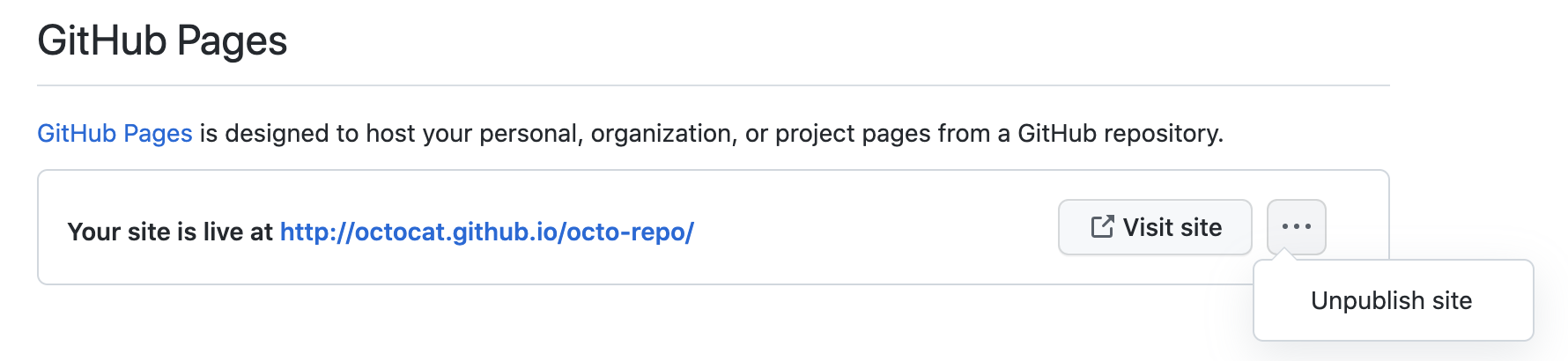
    Drop down menu to unpublish site