Limit OneDrive access by security group
 This feature is in preview and will require a Microsoft Syntex Advanced Management license when the feature becomes generally available (GA)
Use this setting if you want to allow only users in specified security groups to access OneDrive. Even if other users outside of these security groups are licensed for OneDrive, they won’t have access to their own OneDrive or any shared OneDrive content.
Requirements
To access and use this feature, your organization must have one of the following subscriptions:
- Office 365 E5/A5
- Microsoft 365 E5/A5
Enablement
To enable this feature:
Go to Access control in the SharePoint admin center, and sign in with an account that has admin permissions for your organization.
Select Limit OneDrive access.
Select Limit OneDrive access to only users in specified security groups.
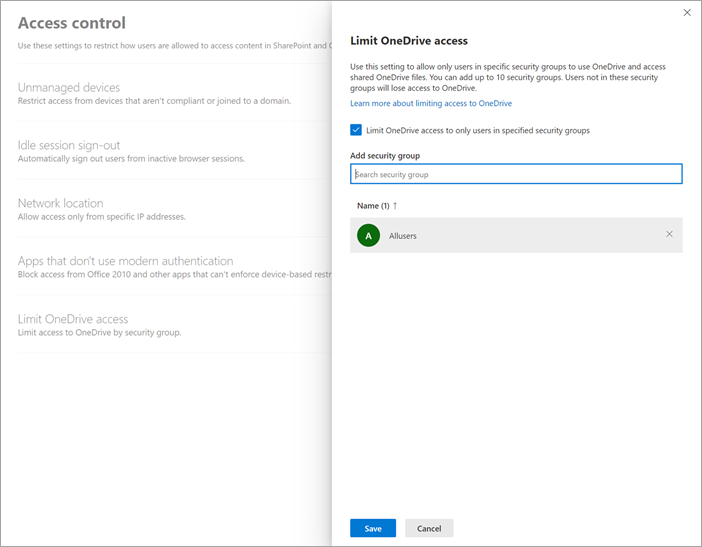
Add the security groups you want to be able to use OneDrive.
Select Save.
Note
Users who aren't included in the security groups you added will lose access to their own OneDrive and any shared OneDrive content.
Feedback
Submit and view feedback for