Managing secret scanning alerts
Note: Alerts are created only for repositories with secret scanning alerts for users enabled. Secrets found in public repositories using the free secret scanning alerts for partners service are reported directly to the partner, without creating an alert. For more information, see "Secret scanning patterns."
-
On GitHub.com, navigate to the main page of the repository.
-
Under the repository name, click Security. If you cannot see the "Security" tab, select the dropdown menu, and then click Security.

-
In the left sidebar, under "Vulnerability alerts", click Secret scanning.
-
Under "Secret scanning" click the alert you want to view.
-
Optionally, if the leaked secret is a GitHub token, check the validity of the secret and follow the remediation steps.
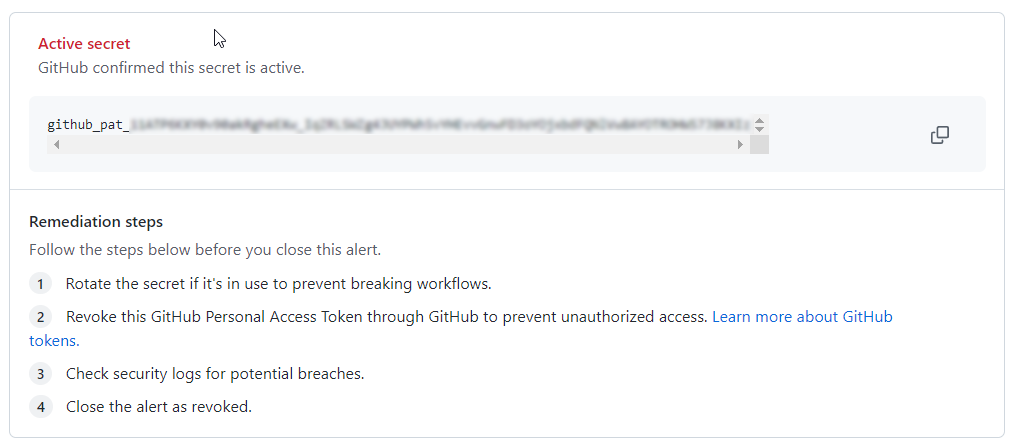
Note: Validity check for GitHub tokens is currently in public beta and subject to change.
GitHub provides information about the validity of the secret, for GitHub tokens only.
Validity Result Active secret GitHub confirmed this secret is active Active secret GitHub checked with this secret's provider and found that the secret is active Possibly active secret GitHub does not support validation checks for this token type yet Possibly active secret GitHub could not verify this secret Secret appears inactive You should make sure no unauthorized access has already occurred -
To dismiss an alert, select the "Close as" dropdown menu and click a reason for resolving an alert.

-
Optionally, in the "Comment" field, add a dismissal comment. The dismissal comment will be added to the alert timeline and can be used as justification during auditing and reporting. You can view the history of all dismissed alerts and dismissal comments in the alert timeline. You can also retrieve or set a comment by using the Secret scanning API. The comment is contained in the
resolution_commentfield. For more information, see "Secret scanning" in the REST API documentation. -
Click Close alert.


Securing compromised secrets
Once a secret has been committed to a repository, you should consider the secret compromised. GitHub recommends the following actions for compromised secrets:
- For a compromised GitHub personal access token, delete the compromised token, create a new token, and update any services that use the old token. For more information, see "Creating a personal access token."
- For all other secrets, first verify that the secret committed to GitHub is valid. If so, create a new secret, update any services that use the old secret, and then delete the old secret.
Note: If a secret is detected in a public repository on GitHub.com and the secret also matches a partner pattern, an alert is generated and the potential secret is reported to the service provider. For details of partner patterns, see "Secret scanning patterns."
Configuring notifications for secret scanning alerts
When a new secret is detected, GitHub notifies all users with access to security alerts for the repository according to their notification preferences. You will receive an email notification if you are watching the repository, have enabled notifications for security alerts or for all the activity on the repository, or are the author of the commit that contains the secret and are not ignoring the repository.
For more information, see "Managing security and analysis settings for your repository" and "Configuring notifications."