How to evaluate with Azure AI Studio and SDK
Note
Azure AI Studio is currently in public preview. This preview is provided without a service-level agreement, and is not recommended for production workloads. Certain features might not be supported or might have constrained capabilities. For more information, see Supplemental Terms of Use for Microsoft Azure Previews.
To thoroughly assess the performance of your generative AI application when applied to a substantial dataset, you can initiate an evaluation process. During this evaluation, your application is tested with the given dataset, and its performance will be quantitatively measured with both mathematical based metrics and AI-assisted metrics. This evaluation run provides you with comprehensive insights into the application's capabilities and limitations.
To carry out this evaluation, you can utilize the evaluation functionality in Azure AI Studio, a comprehensive platform that offers tools and features for assessing the performance of your generative AI model. In AI Studio, you're able to log, view and analyze detailed evaluation metrics.
In this article, you learn to create an evaluation run from a test dataset or flow with built-in evaluation metrics from Azure AI Studio UI. For greater flexibility, you can establish a custom evaluation flow and employ the custom evaluation feature. Alternatively, if your objective is solely to conduct a batch run without any evaluation, you can also utilize the custom evaluation feature.
Prerequisites
To run an evaluation with AI-assisted metrics, you need to have the following ready:
- A test dataset in one of these formats:
csvorjsonl. If you don't have a dataset available, we also allow you to input data manually from the UI. - A deployment of one of these models: GPT 3.5 models, GPT 4 models, or Davinci models.
- A runtime with compute instance to run the evaluation.
Create an evaluation with built-in evaluation metrics
An evaluation run allows you to generate metric outputs for each data row in your test dataset. You can choose one or more evaluation metrics to assess the output from different aspects. You can create an evaluation run from the evaluation and prompt flow pages in AI Studio. Then an evaluation creation wizard appears to guide you through the process of setting up an evaluation run.
From the evaluate page
From the collapsible left menu, select Evaluation > + New evaluation.

From the flow page
From the collapsible left menu, select Prompt flow > Evaluate > Built-in evaluation.

Basic information
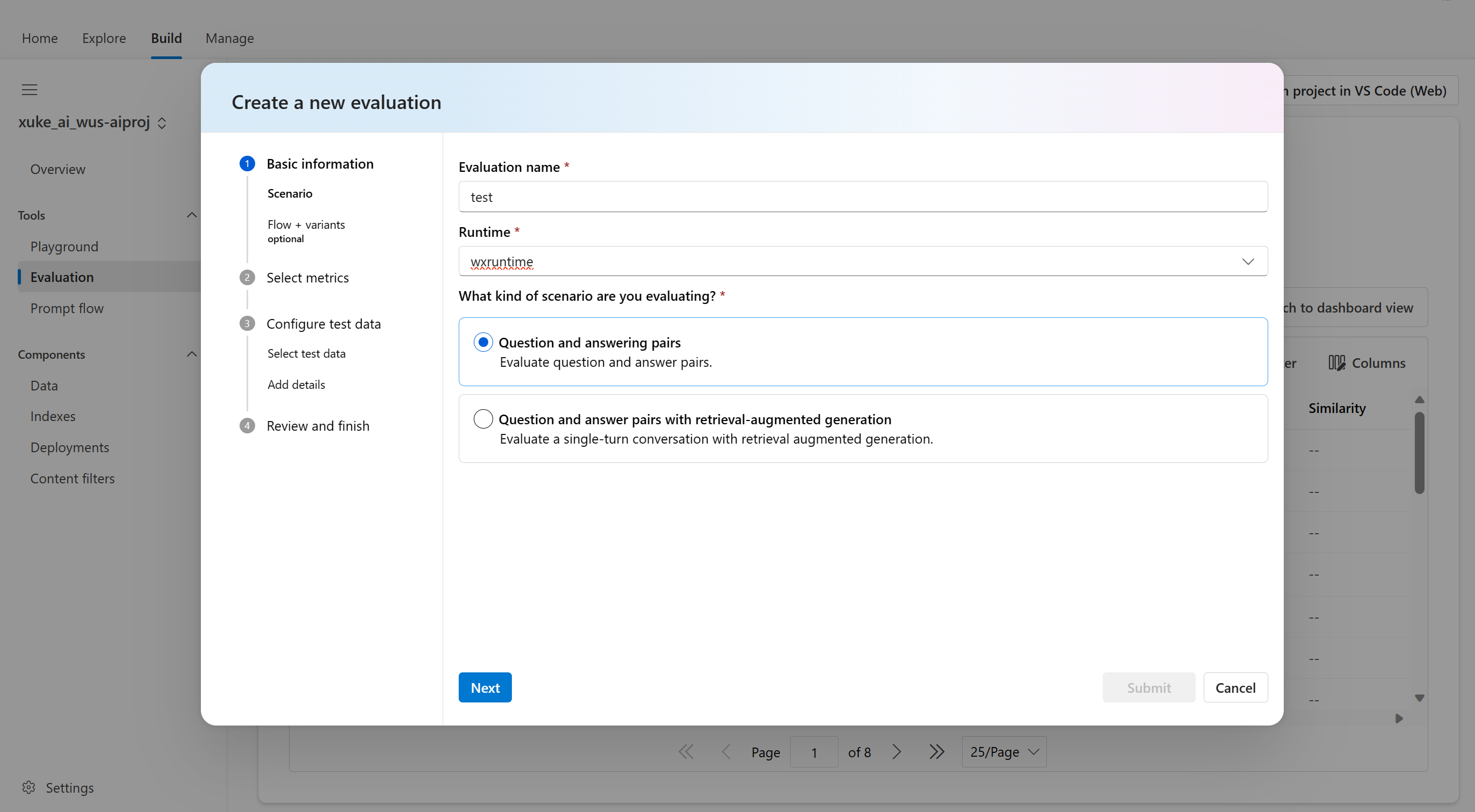
When you enter the evaluation creation wizard, provide a name for your evaluation run and select the scenario that best aligns with your application's objectives. You need to select a runtime to run the evaluation. A runtime is a compute instance with environment attached. If you don't have any runtime available, navigate to Build > Settings to create one. We currently offer support for the following scenarios:
- Question answering: This scenario is designed for applications that involve answering user queries and providing responses.
- Conversation: This scenario is suitable for applications where the model engages in conversation using a retrieval-augmented approach to extract information from your provided documents and generate detailed responses.
Note
For conversation scenario, we currently only support single turn in the Azure AI Studio UI. However, we provide support for multi-turn conversations in the Azure AI SDK and CLI.
By specifying the appropriate scenario, we can tailor the evaluation to the specific nature of your application, ensuring accurate and relevant metrics.
- Evaluate from data: If you already have your model generated outputs in a test dataset, skip the “Add flow and variants” step and directly go to the next step to select metrics.
- Evaluate from flow: If you initiate the evaluation from the Flow page, we'll automatically select your flow to evaluate. If you intend to evaluate another flow, you can select a different one. It's important to note that within a flow, you might have multiple nodes, each of which could have its own set of variants. In such cases, you need to specify both the node and the particular variants you wish to assess during the evaluation process.

Select metrics
By default, we preselect certain recommended metrics based on the scenario you previously selected. You can refer to the table below for the default metrics, and the complete list of metrics we offer support for in each scenario. For more in-depth information on each metric definition and how it's calculated, learn more here.
| Scenario | Default metrics | All metrics |
|---|---|---|
| Question Answering | Groundedness, Relevance, Coherence | Groundedness, Relevance, Coherence, Fluency, GPT Similarity, F1 Score, Exact Match, ADA Similarity For question answering scenario, we currently don't support Exact Match and ADA Similarity in the Azure AI Studio. These metrics are available in the Azure AI SDK and Azure AI CLI. |
| Conversation | Groundedness, Relevance, Retrieval Score | Groundedness, Relevance, Retrieval Score |
When using AI-assisted metrics for evaluation, you must specify a GPT model for the calculation process. Choose a deployment with either GPT-3.5, GPT-4, or the Davinci model for our calculations.

Configure test data
You can select from pre-existing datasets or upload a new dataset specifically to evaluate. The test dataset needs to have the model generated outputs to be used for evaluation if there's no flow selected.

Choose existing dataset: You can choose the test dataset from your established dataset collection.

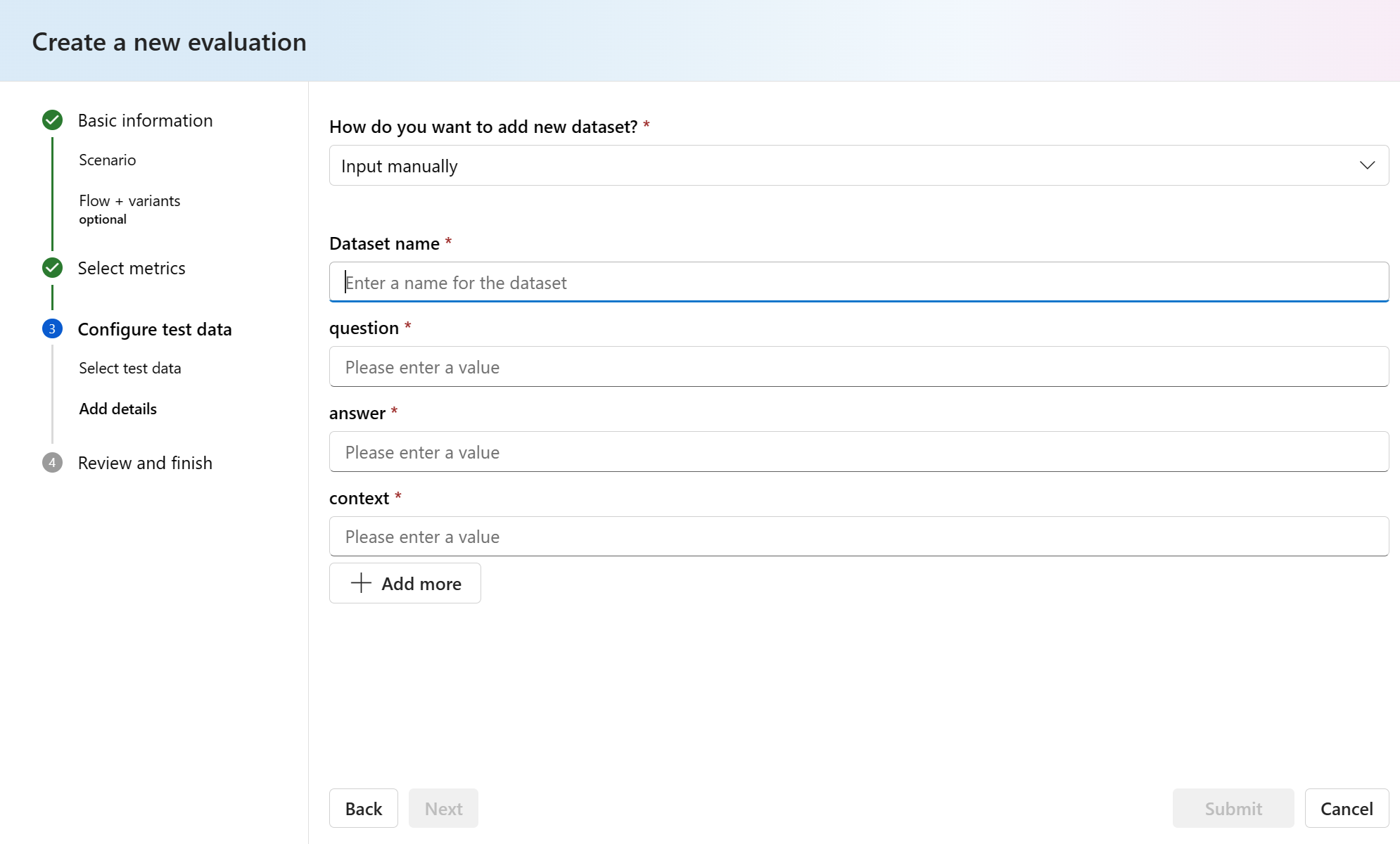
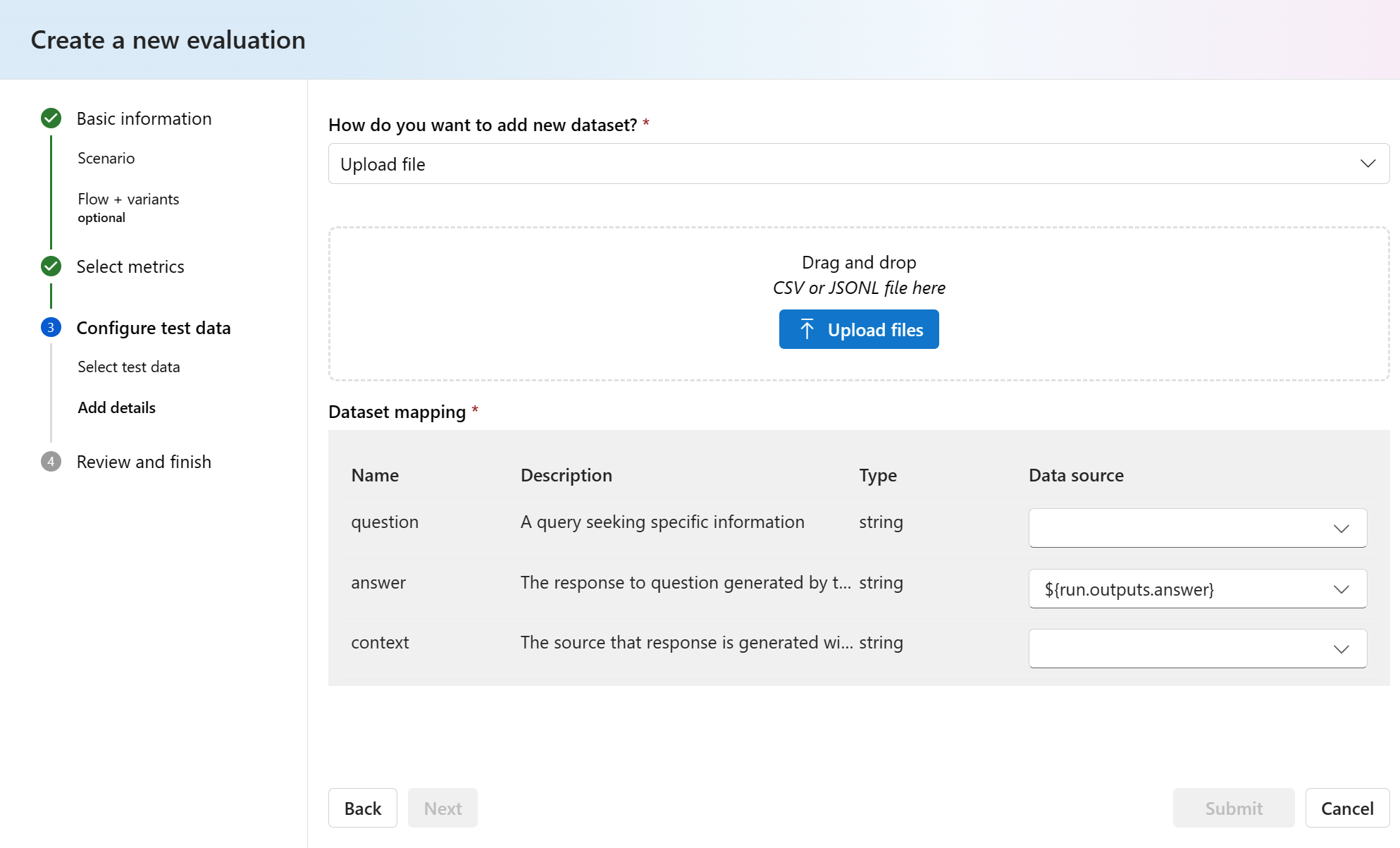
Add new dataset: You can either upload files from your local storage or manually enter the dataset.
For the 'Upload file' option, we only support
.csvand.jsonlfile formats.
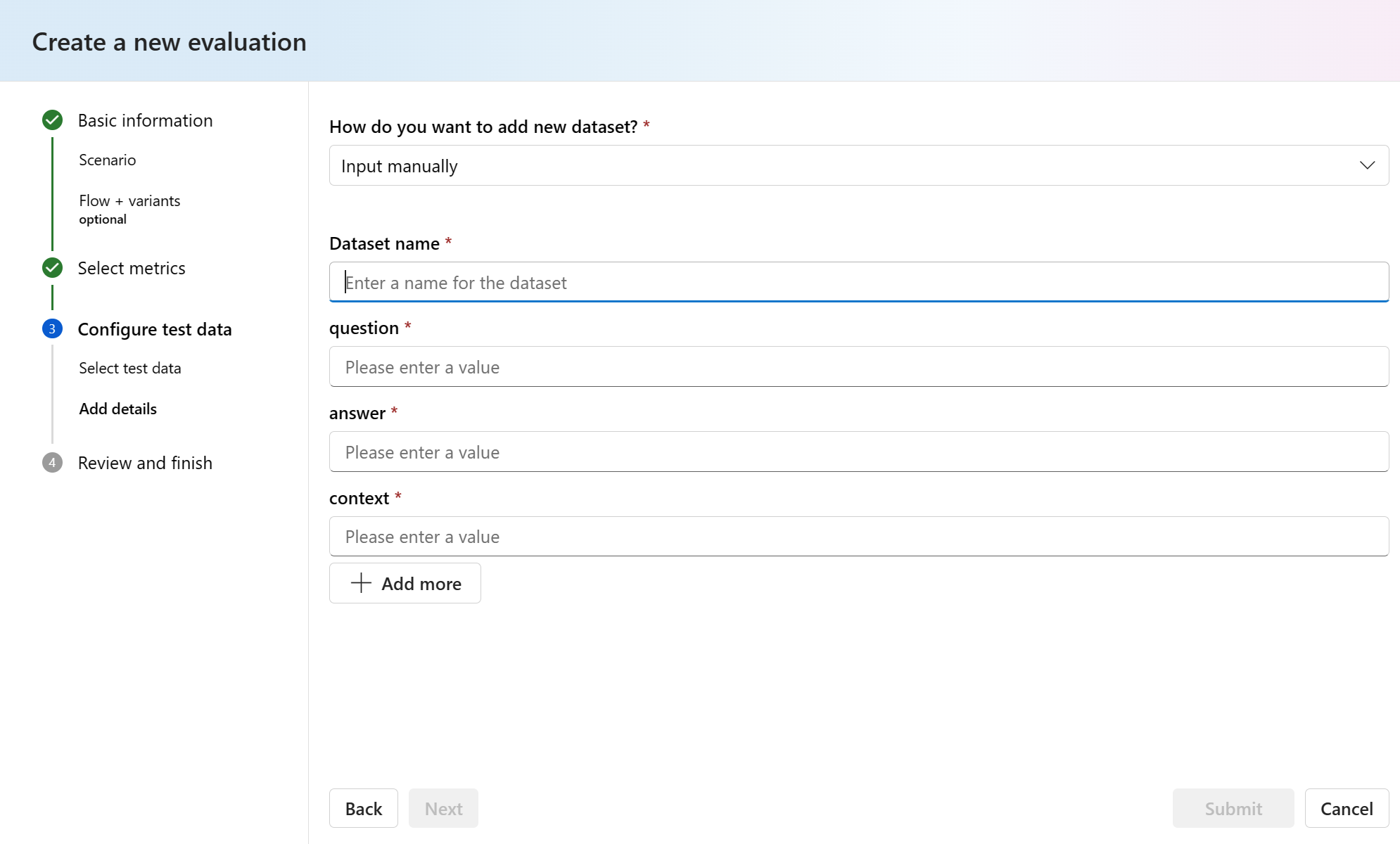
Manual input is only supported for Question Answering scenario.
Data mapping: You must specify which data columns in your dataset correspond with inputs needed in the evaluation. Different evaluation metrics demand distinct types of data inputs for accurate calculations. For guidance on the specific data mapping requirements for each metric, refer to the information provided below:

Question answering metric requirements
| Metric | Question | Response | Context | Ground truth |
|---|---|---|---|---|
| Groundedness | Required: Str | Required: Str | Required: Str | N/A |
| Coherence | Required: Str | Required: Str | N/A | N/A |
| Fluency | Required: Str | Required: Str | N/A | N/A |
| Relevance | Required: Str | Required: Str | Required: Str | N/A |
| GPT-similarity | Required: Str | Required: Str | N/A | Required: Str |
| F1 Score | Required: Str | Required: Str | N/A | Required: Str |
| Exact Match | Required: Str | Required: Str | N/A | Required: Str |
| ADA similarity | Required: Str | Required: Str | N/A | Required: Str |
- Question: the question asked by the user in Question Answer pair
- Response: the response to question generated by the model as answer
- Context: the source that response is generated with respect to (that is, grounding documents)
- Ground truth: the response to question generated by user/human as the true answer
Conversation metric requirements
| Metric | Question | Answer | Context from retrieved documents |
|---|---|---|---|
| Groundedness | Required: str | Required: str | Required: str |
| Relevance | Required: str | Required: str | Required: str |
| Retrieval score | Required: str | N/A | Required: str |
- Question: the question asked by the user extracted from the conversation history
- Response: the response generated by the model
- Context: the relevant source from retrieved documents by retrieval model or user provided context that response is generated with respect to
Review and finish
After completing all the necessary configurations, you can review and proceed to select 'Create' to submit the evaluation run.

Create an evaluation with custom evaluation flow
There are two ways to develop your own evaluation methods:
- Customize a Built-in Evaluation Flow: Modify a built-in evaluation flow. Find the built-in evaluation flow from the flow creation wizard - flow gallery, select “Clone” to do customization.
- Create a New Evaluation Flow from Scratch: Develop a brand-new evaluation method from the ground up. In flow creation wizard, select “Create” Evaluation flow then you can see a template of evaluation flow.
The process of customizing and creating evaluation methods is similar to that of a standard flow.
To thoroughly assess the performance of your generative AI application when applied to a substantial dataset, you can evaluate in your development environment with the Azure AI SDK. Given either a test dataset or flow target, your generative AI application performance is quantitatively measured with both mathematical based metrics and AI-assisted metrics. This evaluation run provides you with comprehensive insights into the application's capabilities and limitations.
In this article, you learn to create an evaluation run from a test dataset or flow with built-in evaluation metrics from Azure AI Studio SDK then view the results in Azure AI Studio if you choose to log it there.
Prerequisites
To evaluate with AI-assisted metrics, you need:
- A test dataset in
.jsonlformat. See the next section for dataset requirements - A deployment of one of these models: GPT 3.5 models, GPT 4 models, or Davinci models.
Supported scenarios and datasets
We currently offer support for these scenarios:
- Question Answering: This scenario is designed for applications that involve answering user queries and providing responses.
- Conversation: This scenario is suitable for applications where the model engages in conversation using a retrieval-augmented approach to extract information from your provided documents and generate detailed responses.
For more in-depth information on each metric definition and how it's calculated, learn more here.
| Scenario | Default metrics | All metrics |
|---|---|---|
| Question Answering | Groundedness, Relevance, Coherence | Groundedness, Relevance, Coherence, Fluency, GPT Similarity, F1 Score, Exact Match, ADA Similarity |
| Conversation | Groundedness, Relevance, Retrieval Score | Groundedness, Relevance, Retrieval Score |
When using AI-assisted metrics for evaluation, you must specify a GPT model for the calculation process. Choose a deployment with either GPT-3.5, GPT-4, or the Davinci model for your calculations. If you select ADA similarity, it requires an embedding model and you must also select a deployment featuring the text-similarity-ada-001 or text-similarity-ada-002 model to support ADA similarity calculations.
Supported input data format for question answering
We require question and answer pairs in .jsonl format with the required fields as follows:
| Metric | Question | Response | Context | Ground truth |
|---|---|---|---|---|
| Groundedness | Required: Str | Required: Str | Required: Str | N/A |
| Relevance | Required: Str | Required: Str | Required: Str | N/A |
| Coherence | Required: Str | Required: Str | N/A | N/A |
| Fluency | Required: Str | Required: Str | N/A | N/A |
| GPT-similarity | Required: Str | Required: Str | N/A | Required: Str |
| F1 Score | Required: Str | Required: Str | N/A | Required: Str |
| Exact Match | Required: Str | Required: Str | N/A | Required: Str |
| ADA similarity | Required: Str | Required: Str | N/A | Required: Str |
- Question: the question asked by the user in Question Answer pair
- Response: the response to question generated by the model as answer
- Context: the source that response is generated with respect to (that is, grounding documents)
- Ground truth: the response to question generated by user/human as the true answer
An example of a question and answer pair with context and ground truth provided:
{
  "question":"What is the capital of France?",
  "context":"France is in Europe",
  "answer":"Paris is the capital of France.",
  "ground_truth": "Paris"
}
Supported input data format for conversation
We require a chat payload in the following .jsonl format, which is a list of conversation turns (within "messages") in a conversation.
Each conversation turn contains:
content: The content of that turn of the conversation.role: Either the user or assistant."citations"(within"context"): Provides the documents and its ID as key value pairs from the retrieval-augmented generation model.
Note
Currently only metrics for conversations or chat payloads with "citations" field provided (RAG scenario) are supported.
| Metric | Citations from retrieved documents |
|---|---|
| Groundedness | Required: str |
| Relevance | Required: str |
| Retrieval score | Required: str |
Citations: the relevant source from retrieved documents by retrieval model or user provided context that model's response is generated with respect to.
{
    "messages": [
        {
            "content": "<conversation_turn_content>",
            "role": "<role_name>",
            "context": {
                "citations": [
                    {
                        "id": "<content_key>",
                        "content": "<content_value>"
                    }
                ]
            }
        }
    ]
}
Evaluate with the Azure AI SDK
Built-in evaluation metrics are available with the following installation:
pip install azure-ai-generative[evaluate]
Import default metrics with:
from azure.ai.generative.evaluate import evaluate
For the supported scenarios mentioned previously, we provide default metrics by task_type as shown in the chart later in this article. The evaluate() function calculates a default set of metrics with option to override metrics with metrics_list which accepts metrics as string:
| Scenario task type | task_type value |
Default metrics | All metrics |
|---|---|---|---|
| Question Answering | qa |
gpt_groundedness (requires context), gpt_relevance (requires context), gpt_coherence |
gpt_groundedness, gpt_relevance, gpt_coherence, gpt_fluency, gpt_similarity, f1_score, exact_match, ada_similarity |
| Single and multi-turn conversation (context required) | chat |
gpt_groundedness, gpt_relevance, gpt_retrieval_score |
gpt_groundedness, gpt_relevance, gpt_retrieval_score |
Set up your Azure Open AI configurations for AI-assisted metrics
Before you call the evaluate() function, your environment needs to set up your large language model deployment configuration that's required for generating the AI-assisted metrics.
from azure.identity import DefaultAzureCredential
from azure.ai.generative import AIClient

client = AIClient.from_config(DefaultAzureCredential())
Evaluate question answering: qa
Run a flow and evaluate
We provide an evaluate function call with the following interface for running a local flow and then evaluating the results.
result = evaluate(
    evaluation_name="my-qa-eval-with-flow", #name your evaluation to view in AI studio
    target=myflow, # pass in a flow that you want to run then evaluate results on
    data=mydata, # data to be evaluated
    task_type="qa", # for different task types, different metrics are available
    metrics_list=["gpt_groundedness","gpt_relevance","gpt_coherence","gpt_fluency","gpt_similarity"] #optional superset over default set of metrics
    model_config= { #for AI-assisted metrics, need to hook up AOAI GPT model for doing the measurement
            "api_version": "2023-05-15",
            "api_base": os.getenv("OPENAI_API_BASE"),
            "api_type": "azure",
            "api_key": os.getenv("OPENAI_API_KEY"),
            "deployment_id": os.getenv("AZURE_OPENAI_EVALUATION_DEPLOYMENT")
    },
    data_mapping={
        "questions":"question", #column of data providing input to model
        "contexts":"context", #column of data providing context for each input
        "y_test":"groundtruth" #column of data providing ground truth answer, optional for default metrics
        },
    output_path="./myevalresults", #optional: save output artifacts to local folder path
    tracking_uri=client.tracking_uri #optional: if configured with AI client, evaluation gets logged to AI Studio
)
Evaluate on test dataset
Alternatively if you already have a test dataset and don't need to run a flow to get the generated results, you can alter the above function call to not take in a target parameter. However, if no target is specified, you must provide "y_pred" in your data_mapping parameter.
result = evaluate(
    evaluation_name="my-qa-eval-with-data", #name your evaluation to view in AI studio
    data=mydata, # data to be evaluated
    task_type="qa", # for different task types, different metrics are available
    metrics_list=["gpt_groundedness","gpt_relevance","gpt_coherence","gpt_fluency","gpt_similarity"] #optional superset over default set of metrics
    model_config= { #for AI-assisted metrics, need to hook up AOAI GPT model for doing the measurement
            "api_version": "2023-05-15",
            "api_base": os.getenv("OPENAI_API_BASE"),
            "api_type": "azure",
            "api_key": os.getenv("OPENAI_API_KEY"),
            "deployment_id": os.getenv("AZURE_OPENAI_EVALUATION_DEPLOYMENT")
    },
    data_mapping={
        "questions":"question", #column of data providing input to model
        "contexts":"context", #column of data providing context for each input
        "y_pred":"answer", #column of data providing output from model
        "y_test":"groundtruth" #column of data providing ground truth answer, optional for default metrics
        },
    output_path="./myevalresults", #optional: save evaluation results .jsonl to local folder path
    tracking_uri=client.tracking_uri #optional: if configured with AI client, evaluation gets logged to AI Studio
)
Evaluation result
The evaluate() function outputs an EvaluationResult() that includes a metric_summary and artifacts. metric_summary outputs a mean calculated summary of all metrics.
Here's an example output from result.metric_summary:
{
  "mean_gpt_groundedness":4.8, "mean_gpt_relevance":3.7, "mean_gpt_coherence":4.1
}
The artifacts includes the name of the .jsonl file with metrics per data row logged as part as evaluation in AI Studio.
Here's an example output from result.artifacts:
{
  "eval_results.jsonl": "runs:/8657dcb8-57b0-4ea5-9f8d-c040ebfa597f/eval_results.jsonl"
}
The contents of eval_results.jsonl looks like this:
{
  "question": "What is the capital of France?",
  "context": "France is in Europe",
  "answer": "Paris is the capital of France.",
  "ground_truth": "Paris",
  "gpt_groundedness": "5",
  "gpt_coherence": "5",
  "gpt_relevance": "5"
}
You can download your EvaluationResult() with download_evaluation_artifacts() to a local folder path.
result.download_evaluation_artifacts("./myevalresults")
Tip
Get the contents of the result.studio_url property for a link to view your logged evaluation results in AI Studio.
Evaluate Conversation: chat
The same interface can be used with evaluate() for the conversation scenario but with data mapping required only for model output y_pred and task_type="chat" shown below
task_type="chat",
data_mapping={
        "y_pred":"messages", #key name of chat payload format that corresponds to each turn of the conversation if data with model generated output is provided without a target
        }
An example of an output:
{
  "messages": [
    {
      "content": "will my compass work in patagonia",
      "role": "user",
      "context": {
        "customer_info": "## customer_info\n  \nname: Jane Doe   \nage: 28    \nphone_number: 555-987-6543     item_number: 7 \n \n# chat history: \n \n# product context: \n\n"
      }
    },
    {
      "content": "Yes, the Pathfinder Pro-1 Adventure Compass can be used in Patagonia. It is designed for use in both the northern and southern hemispheres and has a built-in adjustable declination correction for precise navigation.",
      "role": "assistant",
      "session_state": {
        "id": "1234-5678-9012-3456"
      },
      "context": {
        "citations": [
          {
            "id": "data/3-product-info/product_info_66.md",
            "content": "# Information about product item_number: 66\nPathfinder Pro-1 Adventure Compass, priced: $39.99.\nExperience accurate navigation and superior outdoor performance\n\nFeatures:\n\nRobust, lightweight ABS plastic construction for durability and easy carry\nPrecision\nTechnical Specs:\n\nBest Use: Hiking, Orienteering, Backpacking"
          },
          {
            "id": "data/3-product-info/product_info_17.md",
            "content": "# Information about product item_number: 17\nRainGuard Hiking Jacket, price $110,\n\n## Brand\nMountainStyle\n\n## Category\nHiking Clothing\n## Features\nHere is a feature list for the RainGuard Hiking Jacket:\n## Features\n- Waterproof and Breathable: The RainGuard Hiking Jacket is designed to keep you dry and comfortable in wet conditions, thanks to its waterproof and breathable fabric.\n\n## Technical Specs\n- **Best Use:** Hiking"
          },
          {
            "id": "customer_info_and_recent_purchases",
            "content": "# current date_time: 2023-10-13 15:00:00\n\n## Customer Details:\n\nName: Jane Doe\nAge: 28\nPhone Number: 555-987-6543\n\n## Recent Purchases:\n\nOrder Number: 5\nDate: 2023-05-01\nItem:\n- Description: TrailMaster X4 Tent\n  Quantity: 1\n  Price: $250\n  Item Number: 1"
          }
        ]
      }
    },
    {
      "content": "and what is the temperature rating of my sleeping bag?",
      "role": "user",
      "session_state": {
        "id": "1234-5678-9012-3456"
      },
      "context": {
        "customer_info": "## customer_info\n  \nname: Jane Doe   \nage: 28 "
      }
    },
    {
      "content": "The CozyNights Sleeping Bag has a temperature rating of 20°F to 60°F (-6°C to 15°C). It is suitable for use in spring, summer, and fall seasons",
      "role": "assistant",
      "context": {
        "citations": [
          {
            "id": "data/3-product-info/product_info_7.md",
            "content": "# Information about product item_number: 7\nCozyNights Sleeping Bag, price $100,\n\n## Brand\nCozyNights\n\n## Category\nSleeping Bags\n\n## Features\n- **Lightweight**: Designed to be lightweight for easy carrying during outdoor adventures.\n- **3-Season**: Suitable for use in spring, summer, and fall seasons.\n\n## Technical Specifications\n- **Material**: Polyester\n- **Color**: Red\n\n## FAQ\n31) What is the temperature rating of the CozyNights Sleeping Bag?\nThe CozyNights Sleeping Bag is rated for 3-season use and has a temperature rating of 20 F to 60 F (-6 C to 15 C)."
          },
          {
            "id": "data/3-product-info/product_info_1.md",
            "content": "# Information about product item_number: 1\nTrailMaster X4 Tent, price $250,\n\n## Brand\nOutdoorLiving\n\n## Category\nTents\n\n## Features\n- Polyester material for durability\n- Spacious interior to accommodate multiple people\n\n## Technical Specs\n**Best Use**: Camping\n**Capacity**: 4-person"
          },
          {
            "id": "customer_info_and_recent_purchases",
            "content": "# current date_time: 2023-10-13 15:01:03\n\n## Customer Details:\n\nName: Jane Doe\nAge: 28\nPhone Number: 555-987-6543\nEmail: Jane.Doe@example.com\nAddress: 789 Broadway St, Seattle, WA 98101\n\nLoyalty Program: True\nLoyalty Program Level: Bronze\n\n## Recent Purchases:\n\nOrder Number: 5\nDate: 2023-05-01\nItem:\n- Description: TrailMaster X4 Tent\n  Quantity: 1\n  Price: $250\n  Item Number: 1"
          }
        ]
      }
    },
    {
      "content": "Awesome, thanks!",
      "role": "user",
      "session_state": {
        "id": "1234-5678-9012-3456"
      },
      "context": {
        "customer_info": "## customer_info\n  \nname: Jane Doe   \nage: 28    \nphone_number: 555-987-6543 "
      }
    },
    {
      "content": "You are welcome, Jane!",
      "role": "assistant",
      "context": {
        "citations": [
          {
            "id": "customer_info_and_recent_purchases",
            "content": "# current date_time: 2023-10-13 15:01:43\n\n## Customer Details:\n\nName: Jane Doe\nAge: 28\nPhone Number: 555-987-6543\nEmail: Jane.Doe@example.com\nAddress: 789 Broadway St, Seattle, WA 98101\n\nLoyalty Program: True\nLoyalty Program Level: Bronze\n\n## Recent Purchases:\n\nOrder Number: 5\nDate: 2023-05-01\nItem:\n- Description: TrailMaster X4 Tent\n  Quantity: 1\n  Price: $250\n  Item Number: 1"
          }
        ]
      }
    }
  ],
  "gpt_retrieval_score": 2,
  "gpt_groundedness": 3.6666666667,
  "gpt_relevance": 3.6666666667
}
Next steps
Learn more about how to evaluate your generative AI applications:
Learn more about harm mitigation techniques.
Feedback
Submit and view feedback for