Overview and setup of Answers in Viva
Answers in Microsoft Viva is a new experience for people in large organizations to learn from each other by asking and answering questions. Access is through the Answers tab in the Viva Engage Teams app.
Answers is a conversational experience to ask questions and connect employees to crowdsourced answers. Natural language processing helps match questions with available answers, and the experience rewards people who contribute to Answers.
Answers works to connect employees based on their subject matter expertise captured in Viva Topics. It helps users get their questions answered, connect with subject matter experts, and increase their learning.
Licensing
If Answers is enabled in the Viva Engage admin center, users who are assigned the Viva Engage Knowledge service plan can use the full Answers experience in the Viva Engage Teams app, including rewards and recognition. The Viva Engage Knowledge service plan is available as part of the Microsoft Viva Suite and Viva Topics products.
Users who aren't assigned the Viva Engage Knowledge service plan receive notifications to questions or answers where they're mentioned and can visit those threads. But they can't navigate the rest of the Answers experience.
Note
As a prerequisite, the tenant must have Yammer enabled, and the user must have access to Yammer services.
Technical requirements
Answers is enabled by default for customers that meet the following technical requirements:
Migrated the Yammer network to Native Mode
Native Mode is a state of a Yammer network where all users are in Azure Active Directory (Azure AD). All communities are Microsoft 365 groups, and all files are stored in SharePoint Online. This setup ensures that the service can appropriately apply topic permissions and management. For more information, see the guide to migrate the network to Native Mode.
Migrated Yammer Topics to Viva Topics
Yammer topics have begun to migrate to Viva Topics. Over the next months, all existing Yammer networks will be migrated. Answers uses Viva Topics to organize questions posted and identify the people associated with certain Topics to help route those questions. Because Viva Topics works across services in Microsoft 365, we require that your Yammer network uses Viva Topics to ensure the best experience with Answers.
For customers awaiting topics migration:
- Microsoft informs existing Yammer customers who purchased Viva Topics or Viva Suite products when the Yammer Topics have migrated to Viva Topics. They're notified by email.
- Interested tenants can request to get Answers enablement prioritized, which may include Native Mode Support or Yammer Topics Migration to Viva Topics. To do so, they can contact their customer account manager/Microsoft support staff for Yammer and file a support ticket. Microsoft reviews and processes these requests.
Learn more about Yammer Topics migration to Viva Topics:
Set up the Viva Engage app
We recommend that all organizations that want to use Answers install the Viva Engage app in Teams to get the best Answers experience. Follow these steps to setup Viva Engage app.
Data storage, export, and compliance
Answers is backed by an Office 365 group and follows the default data retention policies set by your organization, unless a unique policy is set for Answers. The Answers backing group is auto-provisioned when the first question is posted or first the question attachment is created. At the time of creation, all Global admins are assigned as owners of the backing group, which is called Group for Answers in Viva Engage – DO NOT DELETE.
Owners of the backing group should ensure that Answers is kept compliant with network policies and doesn't get accidentally deleted. Admins can export data if you want to delete the backing Office 365 group. If the backing group is deleted, Answers won't be functional.
Note
A soft delete is recoverable within 30 days. A hard delete results in permanent data loss.
Answers data is available in eDiscovery, so you can identify and deliver electronic information that can be used as evidence in legal cases.
GDPR information
For GDPR user data export, verified Yammer admins and Engage admins can follow the Yammer GDPR export guidance. Answers data is bundled with Yammer data. To comply with GDPR data subject requests, you can erase all information about a Yammer user. Learn how to manage GDPR data subject requests in Yammer Enterprise.
Enable Answers
Answers is enabled by default and visible to all users that have the Viva Engage Knowledge service plan assigned. Answers can be disabled and hidden from the Viva Engage Teams app. When disabled, Answers content can still be accessed through existing links, but users can't contribute to threads or navigate the Answers experience.
Only a Microsoft 365 Global admin can change Answers state of enablement. Here's how:
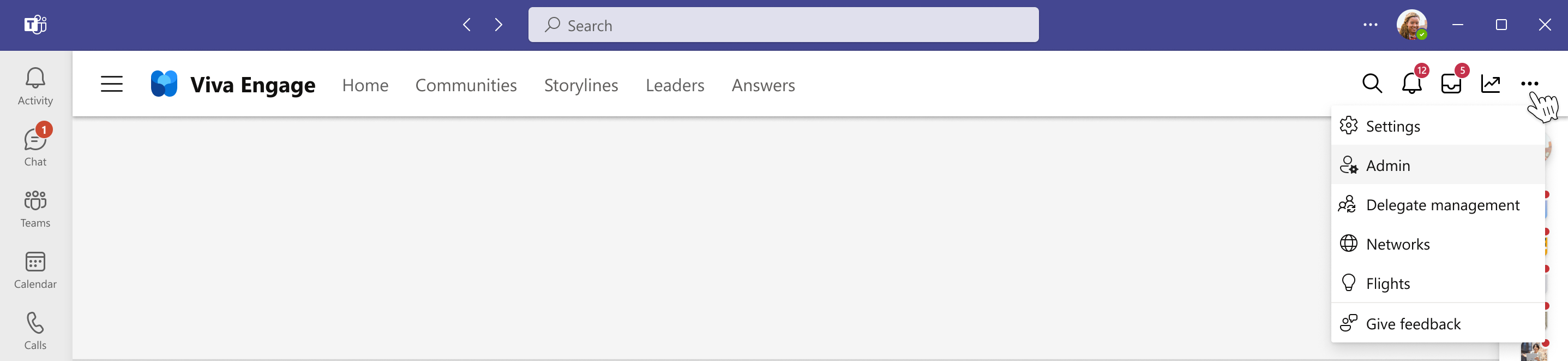
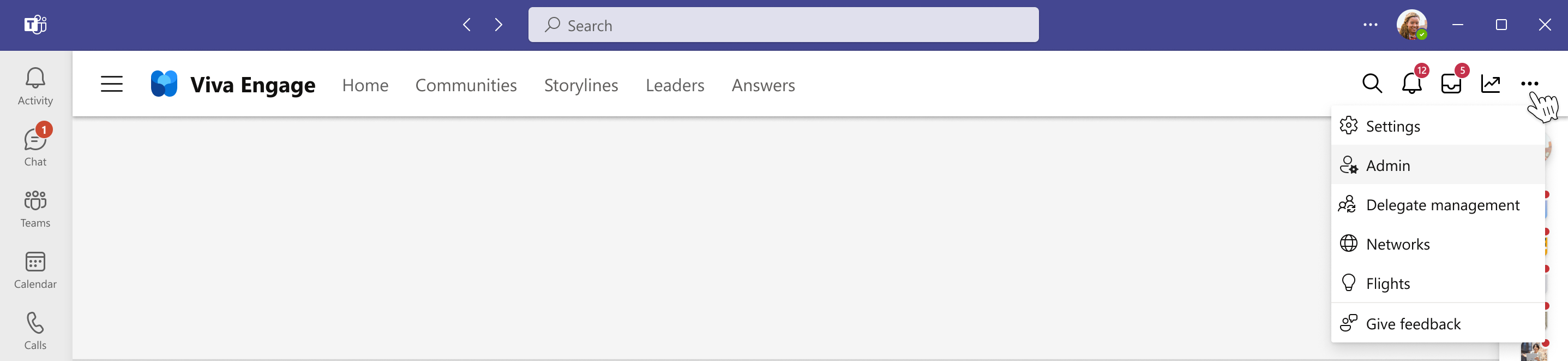
Go to the Viva Engage Teams app.
Select the ellipses button from the top right navigation bar to expose admin options.
Select Admin to navigate to the Viva Engage admin center.
On the Feature management tab, select the Answers button to open the Answers configuration options.

In Answers feature management, you can enable or disable Answers for your organization. Answers is turned on by default for all Viva suite and Viva Topics licensed users.



Note
If Answers is disabled, the backing group will respect the default data retention policies set by your organization, unless a unique policy is set for Answers.
See also
Answers admin scenarios in Viva
Feedback
Submit and view feedback for